
“Compass’ digital PSAT was seamless, stress-free, and best of all, required very little effort from our team.” -Aaron Fulk, Director of College Counseling, University School of Nashville (TN)
Digital Adaptive PSAT Practice Tests
Already taken a PSAT test with Compass? Here is a guide about how to interpret your score report and what to do next.
What Is the Digital PSAT?
The PSAT/NMSQT is a digital, stage-adaptive test scored on a 320 to 1520 scale. It contains two sections, Reading & Writing (54 questions, 64 minutes) and Math (44 questions, 70 minutes), each split into two stages, with the second stage’s difficulty determined by performance on the first. The PSAT taken in October of junior year doubles as the National Merit Scholarship Qualifying Test, with qualifying Selection Index cutoffs that vary by state. For score benchmarks, see what makes a good digital PSAT score, and for qualifying details, see our state-by-state National Merit Semifinalist cutoffs and PSAT and National Merit FAQ.
Free PSAT Practice Options
Most Compass digital PSAT practice tests are administered free to students through our partnerships with hundreds of high schools; your school will share registration details if a test is scheduled. Any student can also take a free guided tour of the Compass Online Testing Center, which mirrors the official digital testing environment and includes hands-on sample questions with every tool the real test provides. College Board also publishes a small set of official PSAT practice tests in its Bluebook app, numbered Practice Test 1, 2, and beyond. When you want more than a score, a full-length PSAT practice test with an interactive score report shows exactly which skills are worth the most points.
PSAT Practice Questions by Section
PSAT Reading & Writing questions test four domains: Craft and Structure, Information and Ideas, Standard English Conventions, and Expression of Ideas, delivered as short passages with one question each. PSAT Math questions cover Algebra, Advanced Math, Problem-Solving and Data Analysis, and Geometry and Trigonometry, in a mix of multiple-choice and student-produced responses, with a calculator allowed throughout. The fastest way to try PSAT practice questions in the real digital format is the free Testing Center tour, where students can answer sample questions using the highlighter, answer eliminator, and flagging tools they will have on test day.
PSAT Calculator Policy
Calculators are allowed on the entire PSAT Math section. The digital testing app includes a built-in Desmos graphing calculator, and students may also bring their own approved calculator. The Compass Online Testing Center includes the same built-in calculator, so students can practice deciding when the on-screen tool is faster than their own. Review College Board’s accepted calculator list before test day.
Part of a school partnership? Your school will give you specific information about how to register if you haven’t already done so. You will receive an email with a link to your test the week before the test. You will also receive a test ID that can be used to access your test
How it Works
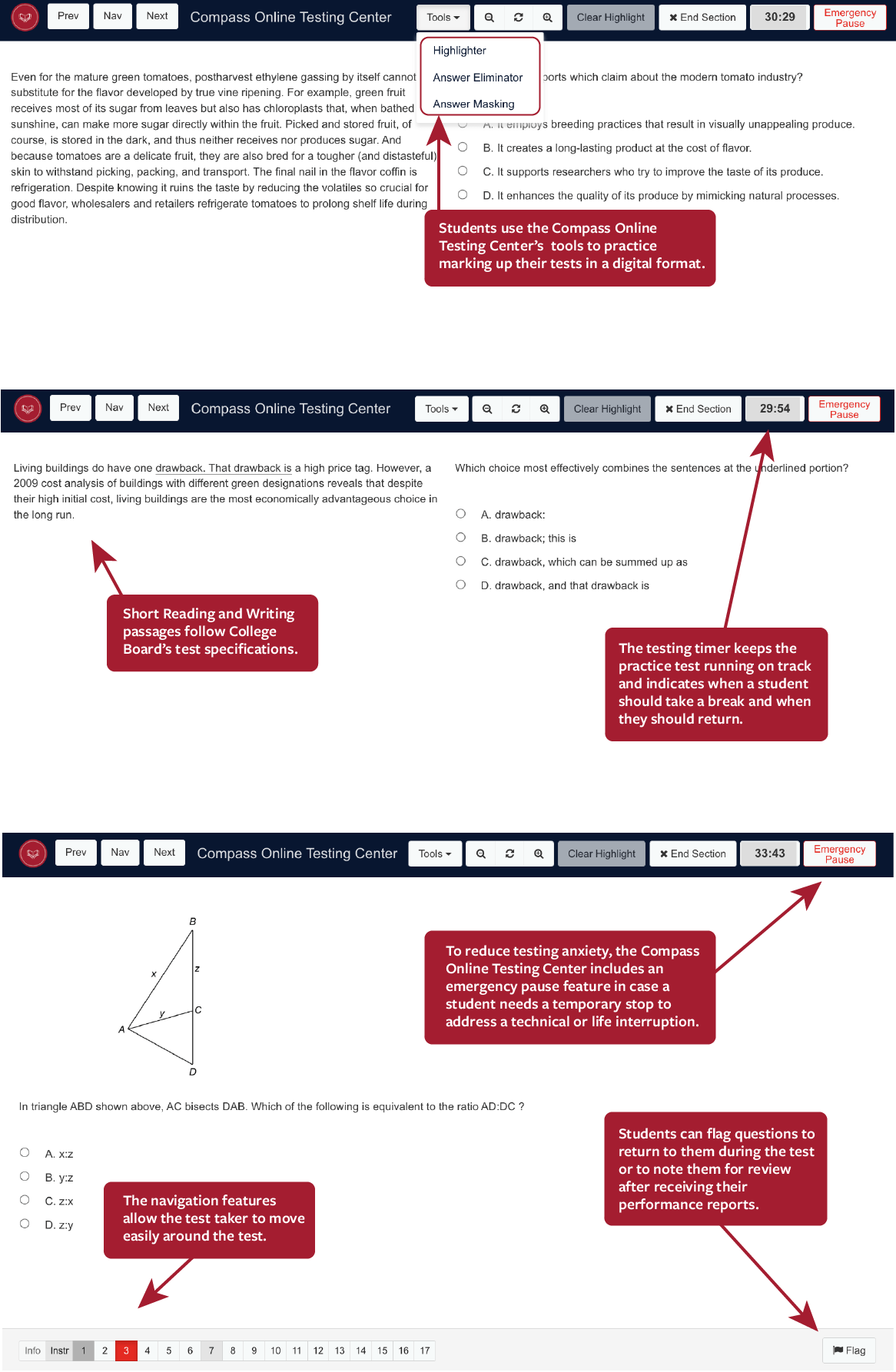
A Testing Platform that Simulates the PSAT
Designed to simulate the digital testing experience, the Compass Online Testing Center provides students with the opportunity to practice in the digital stage adaptive format they test in, using all of the tools College Board offers.
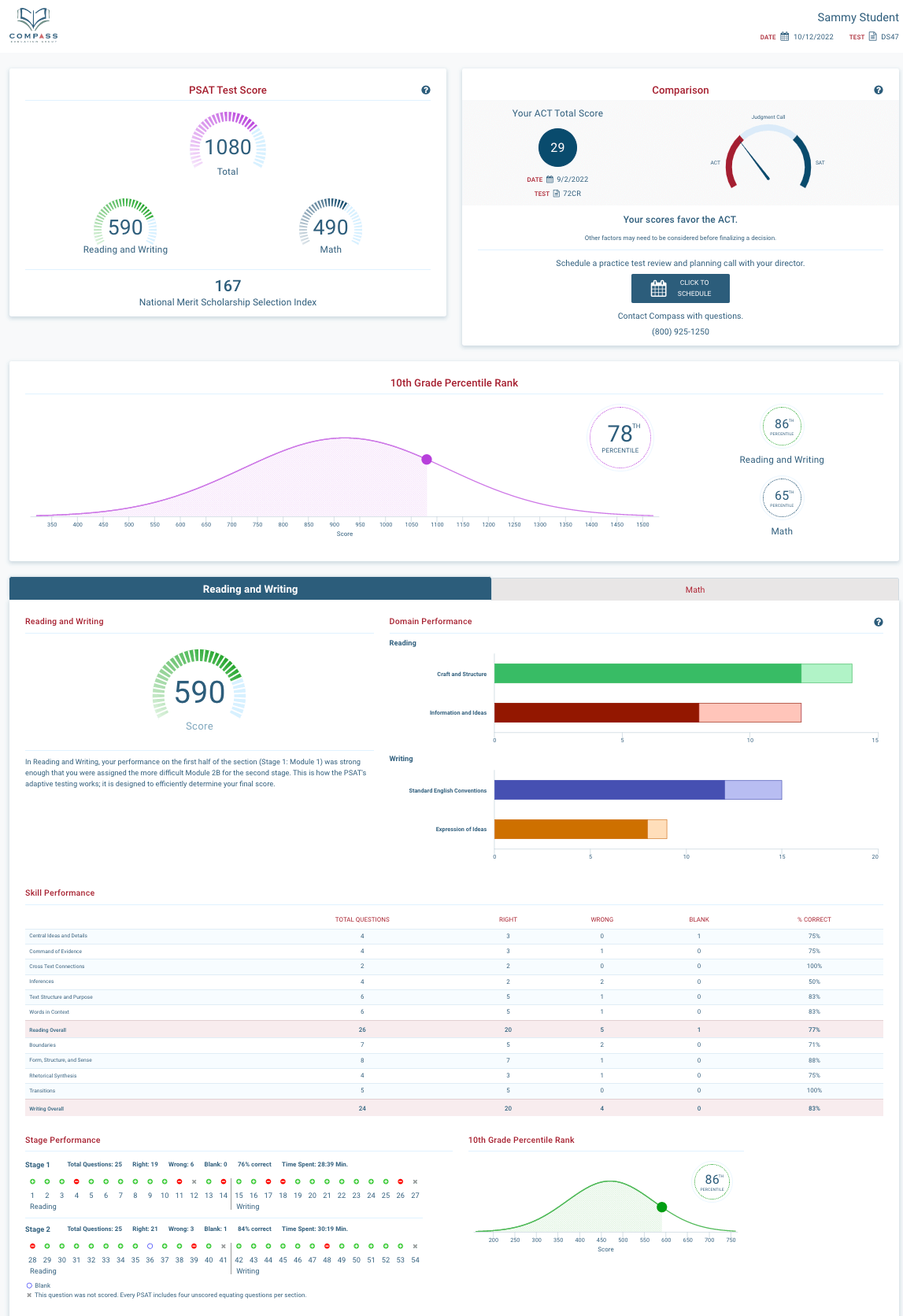
Individual Performance Reports for Students
Each student receives a interactive score report, which indicates whether they received the easier or harder second module in each section. To improve time management, students can review how much time they spent on each question and compare their time to the average time spent to get each question correct. Questions and answers stay available for review for 120 days
The Digital PSAT
An Overview:
- Download our Practice Test Timing Guidelines PDF
- Each section is broken into two stages:
- Reading & Writing contains two stages of 27 questions in 32 minutes
- Math contains two stages of 22 questions in 35 minutes
- Final section of either Reading & Writing or Math questions is 20 minutes (Compass version only; this section does not exist on the official College Board test)
- 50% extended time and double time accommodations are available
- All students must use the entire time for each section; they cannot complete a section early and move on
- All students take the test in the following order: Reading & Writing Stage 1, Reading & Writing Stage 2, Break, Math Stage 1, Math Stage 2
- Students with standard time also receive a final section of either Reading & Writing or Math
- The SAT is not item-adaptive where every question varies based on performance. It is stage-adaptive. It will only adapt once for Reading & Writing and only once for Math. This lowers the stakes on any one question and also preserves the ability to go backward and forward within a stage.
- The first stage of each section is not adaptive (item difficulty will not “adapt” to a student’s performance) and it contains a full range of question difficulty.
- At the end of the first stage, the test will choose which of the two remaining sets of questions is an appropriate level of difficulty: one module will be on average easier and the other module will be on average more difficult. This shift in difficulty is critical to getting to an accurate score on a shorter test.
For more information about the test, our PSAT and National Merit FAQ page has a variety of resources.
Take a Tour of the Demo PSAT Testing Center
Our 13 step tour of the Online Testing Center steps you through each feature and tool, giving you a preview of the testing experience and a guided opportunity to practice using those tools. Tools include:
- Highlighter—highlight passages and questions
- Answer Eliminator—streamline process of elimination
- Question Flagging—mark questions for review at the section or after results are in
- Timer—hide or show the time remaining to keep on pace
Upon entering the Compass Online Testing Center, students are given the opportunity to take this same tour. We strongly encourage all students to take advantage of its instruction, particularly if it is their first time taking a digital practice test with Compass, so they can utilize all of the testing tools.
Note: The demo must be accessed through Safari, Chrome, or Firefox on a laptop, desktop, or tablet. Mobile phones are not supported.
Visit the Online Testing Center Demo
Review an Interactive Score Report
A score tells you where a student stands. It does not tell you why, or what to do next.
Following completion of the exam, our score reports provide detailed analytics of your strengths and weaknesses, testing gaps and opportunities for improvement. In addition to content analysis, we include information you won’t receive from College Board, such as time spent per question and average time students spent to get each question correct, in order to help you understand your time management needs. These same analytics drive instruction in our tutoring programs and PSAT prep classes. Every class includes three full-length adaptive practice tests, and instructors teach against the resulting score reports rather than a fixed syllabus.
- Interactive Score Reports: Explore every question, answer, and metric.
- Time-Per-Question: See exactly where timing broke down.
- Attractor Answers: Analyze the trap choices you fell for and those avoided.
- Percentile Ranking Tool: Measure how score gains change competitive standing.
- Similar Scorers Chart: Compare how students at your level handled each question.
- SAT/ACT Comparison Tool: Gain data-driven guidance on which test to pursue.
- Question Flagging: Revisit questions you got right but never felt sure about.
- Skill-Level Breakdown: Drill into performance by skill area and question type.
- (NEW) Pacing Analysis: Assess opportunities to improve flow and pacing.
Frequently Asked Questions
How long is the test? How much time should we schedule?
The Compass version of the digital, adaptive PSAT practice test is 2 hours and 44 minutes of testing (including a 10-minute break between sections). In order to allow students to read the instructions and practice with the testing interface, we recommend allowing for a 3-hour testing period. Students with +50% or +100% accommodations will need approximately 4-5 hours to complete the exam. Students cannot complete sections early.
What devices are supported?
We support laptops, desktop computers, Chromebooks, and iPads.
The Compass Online Testing Center runs in a web browser; students do not need to download an application. Access to a stable internet connection is very helpful, but students will not lose their work if there is a break in the connection.
What if a student's internet goes out mid-test?
Don’t Panic!
If students lose the internet, our system will automatically try to reconnect for a period of time. If the system is unable to reconnect, the test is paused and the student’s place is saved in the browser’s cached memory. Students can return to the test by following the link in their confirmation email or using the code we provide to the school.
When do students receive their score reports?
Though tests are graded immediately, we slightly delay the release of performance reports to students to decrease the chance that they will be in a group of peers when they receive them, and thus less likely to compare raw scores or answers. Generally, students and their parents will receive reports the evening of the test. Students have 120 days access to score reports.